> ## Documentation Index
> Fetch the complete documentation index at: https://getconvoy.io/docs/llms.txt
> Use this file to discover all available pages before exploring further.
# Events and Event Deliveries
## Ingesting Events
### Payload Size Limits & Best Practices
Keep webhook payloads as concise as possible (ideally under **1MB - 5MB**). Avoid sending large binary data or documents within the webhook payload itself. Instead, pass a URL or reference ID that the receiving endpoint can query to fetch the file. Large payloads consume more memory in Redis during queuing and increase network IOPS, potentially degrading total cluster throughput.
Convoy supports four different message formats to ingest webhook events into Convoy.
This section will help you understand each one of them so that you can select an appropriate format for your use case.
All these formats can both be ingested from the API or through any message broker.
### Directed
This is the most common structure for ingesting events. With this, you supply an `endpoint_id` and the `data` to push to the endpoint.
This integration requires you to create the customer’s endpoint ahead of time and save the `endpoint_id` so you can use it when dispatching to Convoy.
Use this [endpoint](/api-reference/events/create-an-event) to ingest this structure via the API. See the full payload below.
```json Directed event example theme={null}
{
"custom_headers": {},
"data": {},
"endpoint_id": "{string}",
"event_type": "{string}",
"idempotency_key": "{string}"
}
```
### Fan-out
This structure is used to fan out an event to multiple endpoints for a given tenant.
It is common and best practice to enable each customer
to have more than one endpoint and subscribe to specific events on each endpoint.
You can use this structure to offload the task of determining which of the customers' endpoint to receive the event.
All you need to supply in this structure is the `owner_id`, which represents a unique customer in your business.
Use this [endpoint](/api-reference/events/fan-out-an-event) to ingest this structure via the API.
```json Fanout event example theme={null}
{
"custom_headers": {},
"data": {},
"owner_id": "{string}",
"event_type": "{string}",
"idempotency_key": "{string}"
}
```
### Broadcast
This one is used to broadcast one event to multiple tenants in your system.
A use case for this is web3/blockchain events,
where you want to broadcast a social event like `cast.created` to multiple customers.
With this structure,
you will specify
neither `endpoint_id` nor `owner_id` and Convoy will try
to dispatch the event to all endpoints except the endpoint specifically exclude itself through its subscription.
Use this [endpoint](/api-reference/events/create-a-broadcast-event) to ingest this structure via the API.
```json Broadcast event example theme={null}
{
"custom_headers": {},
"data": {},
"event_type": "{string}",
"idempotency_key": "{string}"
}
```
### Dynamic
This one is used to ingest and dispatch webhooks without creating endpoints ahead of time.
In this mode, you’re using Convoy as a proxy to deliver webhooks. Use this [endpoint](/api-reference/events/dynamic-events) to ingest this structure via the API.
```json Dynamic event example theme={null}
{
"url": "{endpoint_url}",
"secret": "{endpoint_secret}",
"data": "{data}",
"event_type": "{event_type}",
"event_types": ["{event_type}"],
"idempotency_key": ""
}
```
## Custom Headers and Idempotency
### Custom Headers
```json Custom header example theme={null}
{
"event_type": "log.sampled",
"data": {
"foo": "bar"
},
"custom_headers": {
"sample-header": "sample-value"
}
}
```
Any key value pairs set in this object will be added as headers to the HTTP request of the webhook.
> If `x-convoy-message-type` set to **broadcast**, the event will be sent to all endpoints in the project, ignoring both the `endpoint_id` and `owner_id` values.
### Idempotency
```json Idempotency example theme={null}
{
"event_type": "log.sampled",
"data": {
"foo": "bar"
},
"custom_headers": {
"sample-header": "sample-value"
},
"idempotency_key": "my-unique-key"
}
```
Idempotency keys are useful for deduplicating REST API calls.
In Convoy, we use them to deduplicate events being sent more than once.
An idempotency key can only be reused when the event bearing that key has been hard deleted after the retention policy window.
> When an event with an existing idempotency key is ingested, it is created as a **duplicate**
> of the former and can be seen on the dashboard, and no event delivery is created for it.
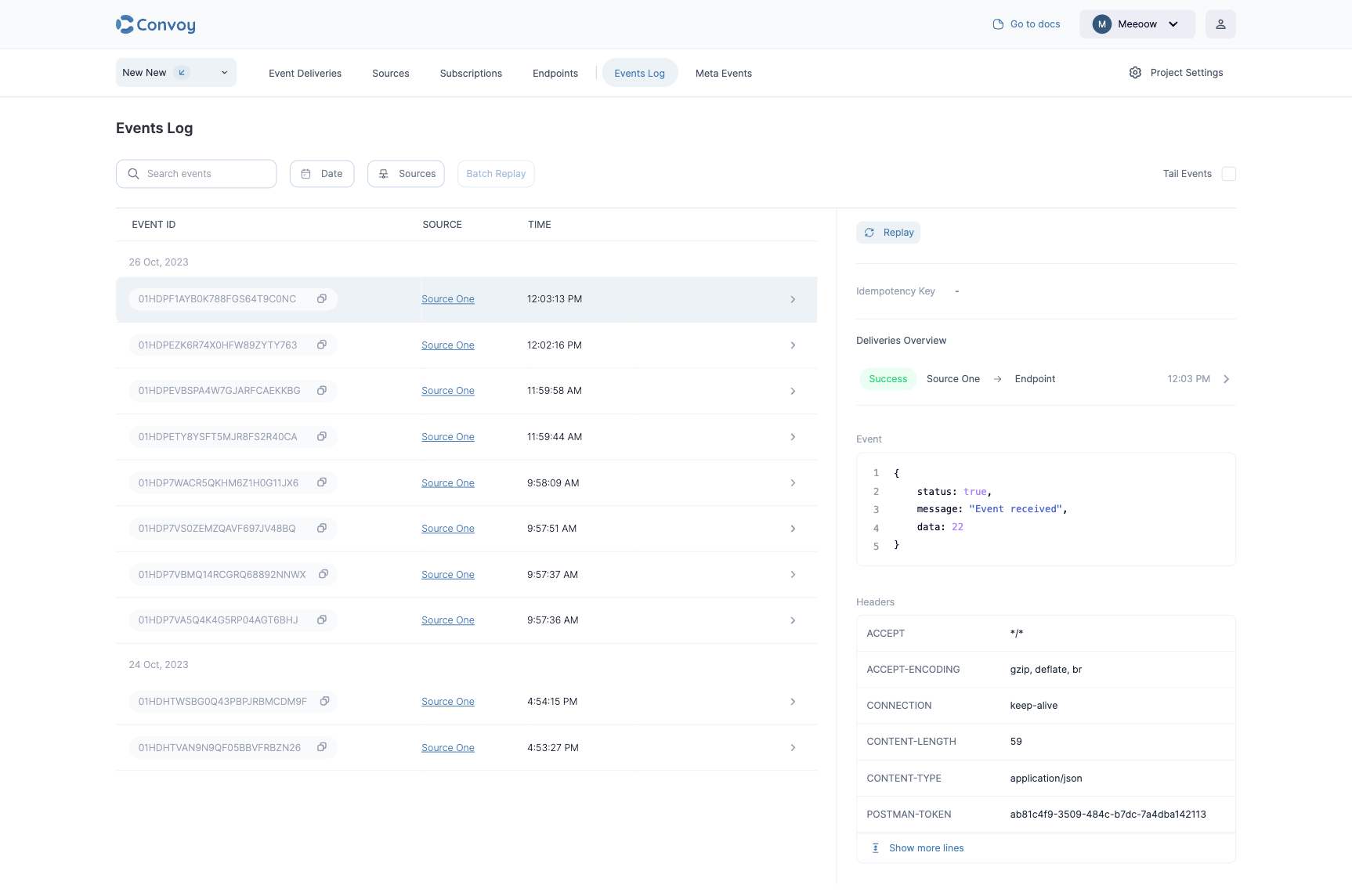
## Events Log
The Events log dashboard represents all webhook events pushed to Convoy.
They do not have a status and do not contain delivery attempts.
It is only a log of events published to Convoy.
The events log page can be accessed from the sidebar.
 ## Event delivery
An event delivery is the combination of an endpoint and an event.
For both incoming and outgoing webhooks project,
an event can generate multiple event deliveries depending on the subscriptions.
An event delivery can have any of the states below:
* `Scheduled`: In this state, the event delivery has been enqueued to the message broker, but a worker node is yet to pick it up for delivery.
* `Processing`: In this state, the event delivery has been retrieved from the message broker by a worker node, and the event is on its way out.
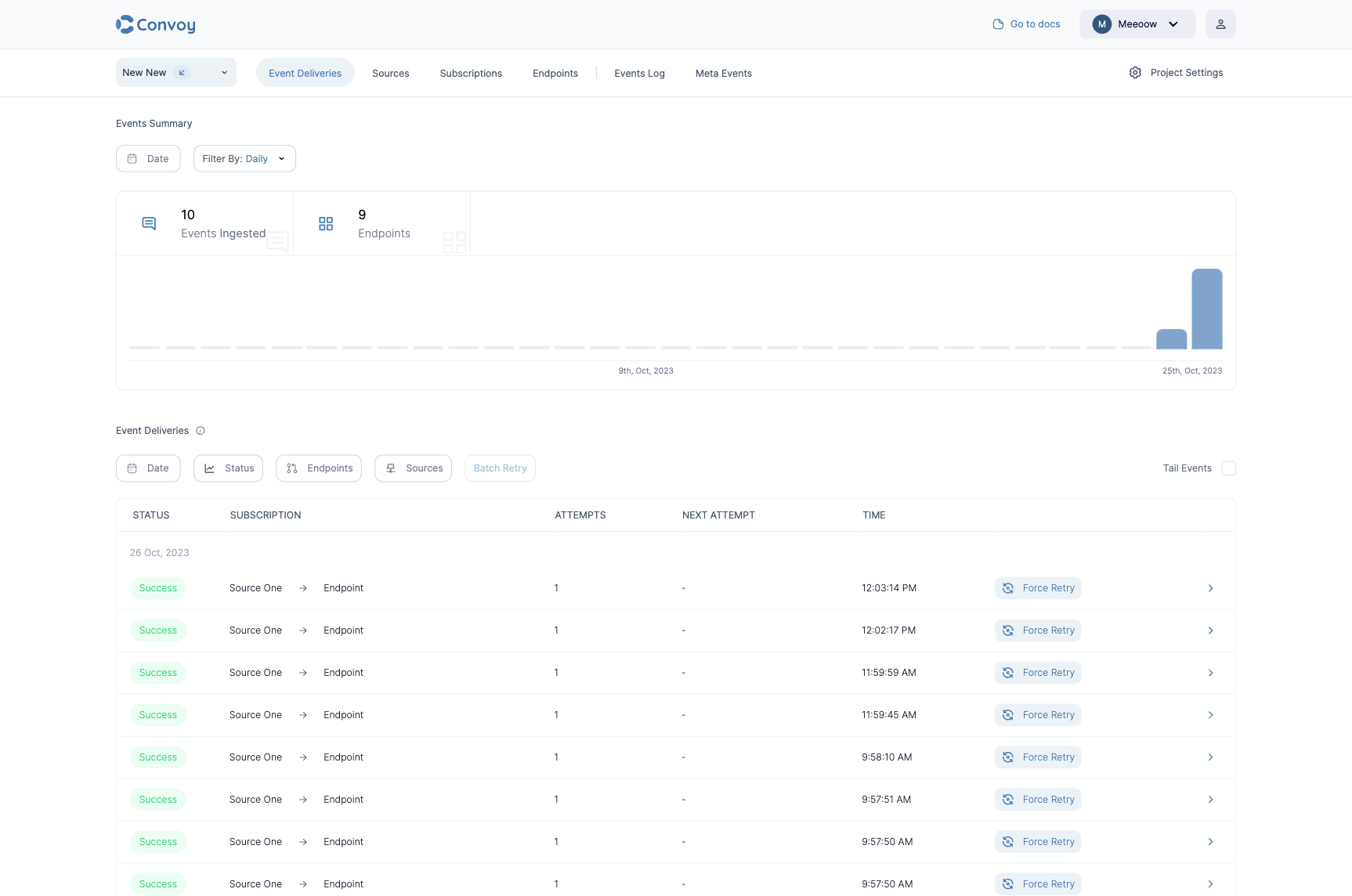
* `Success`: In this state, the event delivery delivered successfully. Here, the `Retry` button becomes `Force Retry`. This is used to retry a successful event in case of a false positive.
* `Retry`: In this state, the event delivery previously failed and the automatic retries have kicked in. Here, Convoy will continue to retry till the max attempts is reached.
* `Failed`: In this state, the event delivery has reached the maximum number of automatic retries and failed to deliver the event or the endpoint failed to acknowledge delivery. Here, the `Retry` button becomes to active to trigger manual retries.
* `Discarded`: In this state, the endpoint has been set to `inactive`, so Convoy did not try to process events to the endpoint at all. See [here](https://getconvoy.io/docs/product-manual/endpoints#endpoint-state) on re-activating the endpoint.
Event deliveries can be viewed on the **Events Deliveries** page below:
## Event delivery
An event delivery is the combination of an endpoint and an event.
For both incoming and outgoing webhooks project,
an event can generate multiple event deliveries depending on the subscriptions.
An event delivery can have any of the states below:
* `Scheduled`: In this state, the event delivery has been enqueued to the message broker, but a worker node is yet to pick it up for delivery.
* `Processing`: In this state, the event delivery has been retrieved from the message broker by a worker node, and the event is on its way out.
* `Success`: In this state, the event delivery delivered successfully. Here, the `Retry` button becomes `Force Retry`. This is used to retry a successful event in case of a false positive.
* `Retry`: In this state, the event delivery previously failed and the automatic retries have kicked in. Here, Convoy will continue to retry till the max attempts is reached.
* `Failed`: In this state, the event delivery has reached the maximum number of automatic retries and failed to deliver the event or the endpoint failed to acknowledge delivery. Here, the `Retry` button becomes to active to trigger manual retries.
* `Discarded`: In this state, the endpoint has been set to `inactive`, so Convoy did not try to process events to the endpoint at all. See [here](https://getconvoy.io/docs/product-manual/endpoints#endpoint-state) on re-activating the endpoint.
Event deliveries can be viewed on the **Events Deliveries** page below:
 ### Delivery insights
Each event delivery records [delivery attempts](/glossary/delivery-attempts) you can inspect on the details page. For every attempt Convoy captures the request and response headers and payload, the HTTP status and any error, the **source IP** the request was sent from, and **requested at** / **responded at** timestamps so you can see exactly when the request left Convoy and when the endpoint replied. The delivery itself also carries a human-readable **description** of its current outcome and an end-to-end **latency**. For retried deliveries the details page shows the newest attempt as the latest attempt and lays out every attempt in a timeline.
## Debugging Event Deliveries
For the most part,
building a dashboard for webhooks requires building the tools for finding and solving problems easily,
this requires the ability to quickly find the affected payload,
application, endpoint and most importantly affected customer.
There are two ways to debug events in Convoy:
### Event filtering
You can filter events and event deliveries by date, time, status and endpoints respectively.
### Delivery insights
Each event delivery records [delivery attempts](/glossary/delivery-attempts) you can inspect on the details page. For every attempt Convoy captures the request and response headers and payload, the HTTP status and any error, the **source IP** the request was sent from, and **requested at** / **responded at** timestamps so you can see exactly when the request left Convoy and when the endpoint replied. The delivery itself also carries a human-readable **description** of its current outcome and an end-to-end **latency**. For retried deliveries the details page shows the newest attempt as the latest attempt and lays out every attempt in a timeline.
## Debugging Event Deliveries
For the most part,
building a dashboard for webhooks requires building the tools for finding and solving problems easily,
this requires the ability to quickly find the affected payload,
application, endpoint and most importantly affected customer.
There are two ways to debug events in Convoy:
### Event filtering
You can filter events and event deliveries by date, time, status and endpoints respectively.  ### Event search
Every hour Convoy tokenizes the entire webhook payload this enables you to search (using full-text search)
the entire payload for any value in any field that enables you to debug issues faster.
Search tokens are retained till they are deleted at the end of the search retention period.
### Event search
Every hour Convoy tokenizes the entire webhook payload this enables you to search (using full-text search)
the entire payload for any value in any field that enables you to debug issues faster.
Search tokens are retained till they are deleted at the end of the search retention period.